Kuku FM is an audio entertainment service with audiobooks, stories, podcasts, and various other kinds of audio material. Like any subscription-based digital service, sometimes customers might require some help in matters related to their account, payments, subscriptions, refunds, technical issues, and so on.
If you are looking for a Kuku FM customer care number, you will have to be careful about verifying the contact information before making a call to a number that you do not recognize. At this point, third-party websites offer different phone numbers, while according to Kuku FM’s current terms, the customer-support email and in-app support are official ways to contact them.
This guide will explain how to reach out to Kuku FM support, what kind of information you should have at hand, and how to solve your issues with subscriptions and accounts.
Table of Contents
How to Contact Kuku FM Customer Care
According to current Kuku FM terms of use, users can contact customer support through Kuku FM service and through in-app chat. The user can also find the following contact information for customer support and complaints:
support@kukufm.com
Therefore, the most reliable options are the following:
- In-app Kuku FM support/chat
- The official customer-support email
- The help/support section inside the Kuku FM service
- The contact information available on official Kuku FM sources
Make sure to verify the contact phone number you plan to use.
Is There a Kuku FM Customer Care Number?
Currently, various third-party directories offer different phone numbers related to Kuku FM customer support. For example, one customer care directory lists 079-4910 7812 for support and 020-71530214 as an office number.
At this point, due to the possibility of becoming outdated, you should not rely on the third-party directories when trying to get the phone number for Kuku FM customer care.
In the current terms of use of Kuku FM, there is no mention of the publicly advertised phone number as an official contact.
Kuku FM Customer Support Email
For written customer support, Kuku FM offers the following email:
support@kukufm.com
It can be used for the following purposes:
- Subscription issues
- Payment issues
- Requesting a refund
- Account problems
- Tech problems
- Complaints
- Additional documents
Kuku FM Support for Subscription Problems
Subscriptions are one of the most popular issues for reaching out to customer support.
You may need assistance with:
- Subscription not activating
- Premium access disappearing
- Surprise charges made
- Renewal of subscription
- Cannot cancel the subscription
- The payment has been processed, yet access is denied
Start by checking the subscription status from within your account.
If the issue persists, then contact Kuku FM via the official support channels.
Kuku FM Auto-Renewal
Services based on the subscription model may auto-renew depending on the terms of the subscription plan and the authorization of payment.
In case you no longer wish to subscribe to the service, check your subscription and payments settings and cancel the auto-renewal through the respective platform.
In case of surprise recurring charges, contact Kuku FM support and at the same time, check the payment service through which the subscription was made.
For instance, subscriptions through Google Play or App Store will require the respective subscription management procedure.
Request for Refunds
Refundability can depend on the type of purchase, the time when it was made, payment options chosen, and the terms.
Kuku FM’s current terms state that under certain circumstances, certain services are refundable and that refund requests can be made through customer support.
When making the refund request, include the following:
- Information about your registered account
- The date of the transaction
- Amount charged
- Transaction reference number
- The reason for the request
- The relevant screenshots
It will allow the support team to investigate the transaction.
What If Money Has Been Deducted From Your Account?
In case you suspect that any amount of money has been deducted for Kuku FM, then the first step is to determine the transaction.
Check the following:
- Bank statement
- UPI application
- Google Play purchase history
- Apple purchase history
- Email receipts
- Kuku FM account
See if the deduction has anything to do with your active subscription or a previous purchase.
Kuku FM Login Problems
If you cannot log in, you need to check whether:
- You use the right mobile number
- You use the right email address
- The OTP is coming to you
- The internet connection is on
- The application is up to date
- You are using the right account
Do not create another account straight away, as it would make it difficult for you to identify which one holds your subscription.
Problems with the Login OTP
In case you are waiting for the login OTP, check the mobile network and the registration number.
Also:
- Pause for a moment and request another OTP
- Restart the application
- Check if the SMS messages are blocked
- Make sure the application is updated
- If there is a problem temporarily with the service – try again at another time
Remember never to give the OTP to another person who claims to be a Kuku FM representative.
Kuku FM App is Not Working
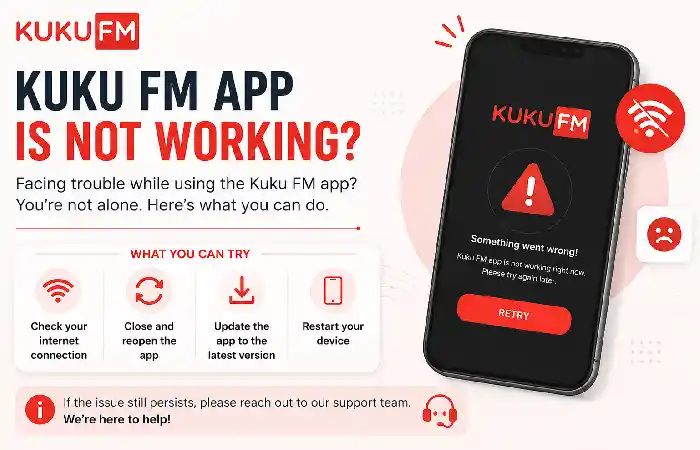
Technical issues might arise due to:
- Outdated app versions
- Bad internet connections
- Temporary server issues
- Device storage problems
- App cache
- OS compatibility
You should perform some troubleshooting actions before contacting support.
Update the App
Check the official app store for an available update for your device.
Restart the App
Close the application and start it again.
Check Your Internet Connection
Switch between Wi-Fi and mobile data.
Restart Your Device
A simple restart might fix any temporary software issues.
Reinstall the Application
If none of the above helps, reinstalling the app might be needed. But remember that you will need your login credentials.
Premium Content Is Not Available
If you have already subscribed to the application and paid for it but the premium content is still not available, do not buy another subscription immediately.
First of all, please:
- Check if the subscription status is OK.
- Log in using the account with which you made a payment.
- Restart the application.
- Check if the payment was successful.
- Contact support if you are unable to access the content.
It is helpful to provide the transaction reference.
Why You Should Be Careful With Customer-Care Numbers
Third-party websites may have many customer care numbers listed.
It is possible that the information published there may be outdated, and some may post unverified customer care numbers.
Therefore, do not assume the legitimacy of the first number that pops up in your search results.
Always validate the number via Kuku FM’s official app, website, or current terms.
Never Share Your OTP
It is not required by customer service to share your OTP.
In case you receive a call or message from a representative of Kuku FM and they request any of the following details, do not share them:
- OTP
- UPI PIN
- ATM PIN
- Card CVV
- Password
- Banking login credentials
Instead, stop the conversation and reach out to Kuku FM via their official channels.
Kuku FM Customer Care for Payment Issues
There may be many entities involved in your payment issues.
For instance, your payment process may involve:
Kuku FM → Payment Gateway → Bank/UPI Provider
And if the payment was made via Google Play or Apple’s App Store, it may also involve the platform.
Which is why it is essential to identify the source of the transaction.
Refer to the receipt of your payment before reaching out to the support team.
What if you are Charged Even After Canceling?
If you think you were charged despite canceling your subscription:
- Identify the cancellation date.
- Identify the date of the subscription renewal.
- Confirm whether or not the cancellation was successful.
- Get the cancellation confirmation receipt.
- Reach out to Kuku FM customer care.
- If required, get in touch with the platform you made the payment through.
Use evidence rather than just your memory in such situations.
What If My Issue is Not Resolved?
Keep records of:
- Earlier emails
- Ticket numbers
- Payment receipts
- Screenshots
- Support responses
- Your communication dates
Kuku FM’s current terms mention an escalation process for grievances that are not resolved, including a grievance officer.
Final Thoughts
It is very hard to find an accurate Kuku FM customer care number since it could include various numbers listed on third-party websites. In this case, one should cross-check their telephone numbers before calling.
The existing conditions at Kuku FM have provided the support@kukufm.com address and in-app customer support as legitimate ways to reach the service.
Be it access login, payment renewal, deduction, or refund, account and transaction information must be provided accurately while contacting customer support.
Above all, never give your OTP, UPI PIN, card PIN, CVV number, or account password to anybody posing as customer service.
Using genuine ways to contact customer support will help you fix your Kuku FM account and payment-related issues.